The Installation
Process
The
Assessment Process:
IEG’s IM Assessment process examines an EAD/LINC Case model and produces reports assessing the risk of migrating the LINC specification to EAD/LDA, NT or Unix LINC.
Deciding on which PC to
install the software:
The PC where you install
the IEG assessment tool must have accessibility to the Internet. If you can access the IEG web site or this
HELP information, then the PC qualifies.
The IM Assessment tool requires visibility
to the web. The initial
loading of the LINC specification can occur without being connected to the
Internet but in order to produce the output assessment documentation, the PC MUST be connected to the Internet. If the PC is not visible to the Internet,
the final stage of the assessment is suspended until the PC is connected.
The operating system of the
PC must be qualified for EAD/LDA releases.
(Note to Windows 95 users: A DOS window titled CLEANUP.BAT might remain
open. Manually close this window.)
Installation:
The IM Assessment tool is installed
using Install Shield Self-extracting software.
The installation step is easy to follow and guides you through the
installation. There is an uninstall icon available to easily uninstall the
software. To install the software first
download the latest IM evaluation software by using the download link found in
the left hand margin of this documentation marked as DOWNLOAD IM.
Install Directory:
The default directory is
C:\IEG\IME, however, the user can change this directory.
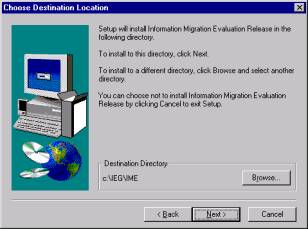
Naming the Windows Program
Folder:
The default program folder
name will be IEG IME.
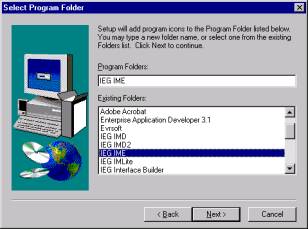
The
registration form:
You must complete the information indicated by the *,
Supply information relative to your
site:
Sample Information:
Organization
Name= IEG Inc Name
= Dennis Phone
803 808 8901 Email
denniss@ieg-inc.com Billing
Email= same PO#=Evaluation
use
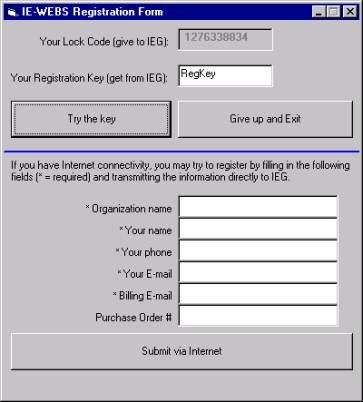
along with a request to name your PC or host name of your PC.
Computer Name= IEG-SC
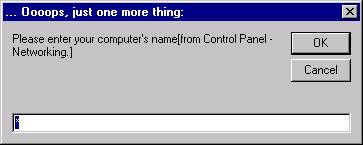
The
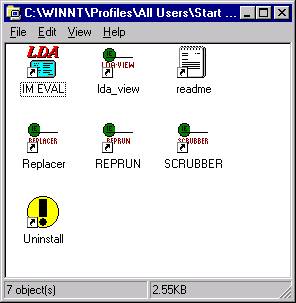
Program Folder:
Getting
Started with the Assessment Process:
Based
on the options selected on the Getting
Started (CONFG) configuration screen, the IM process automatically
analyzes an EAD/ LINC CASE model. After the configuration information is
entered, the assessment process will continue through to its completion. Two documents will automatically be
displayed at the completion of the assessment process using notepad or word
pad.
Risk Assessment
Documents:
IEG's
IEGBID.DOC document and an audit document, AF<modelname>.DOC,
will contain detailed information gathered during the IM assessment. Both documents should be sent to IEG if
you wish to obtain a service quote from IEG to renovated this LINC
specification. If you wish to find
out more information about the renovation process contact the Information Exchange Group.
The
Migration Process:
After
completing the risk assessment, the scope of changes should now be known. The next step in the migration process will
be to decide on making the changes manually or having assistance in making the
changes. Two extended services are
available from IEG. Both of these services require an authorization code to be
provided by IEG. This authorization
code is unique for each model. See
Extended Services for more information.
ü
A
more detailed and in-depth level of documentation is available by ISPEC
outlining recommended line of code changes.
Contact Information
Exchange Group for pricing information and how this level of
documentation can be made available for you to perform the migration change
manually.
ü
Additional services are available from IEG to automate
the Migration Renovation Process. If you have an interest in applying IEGs
automated routines contact Information
Exchange Group for service fees.
IEG automated renovation routines help make the changes necessary to
make a LINC CASE model compliant to:
1.
LDA
Development Compliance
2.
LDA
Run Time Compliance
3.
Modernization
4.
UNIX
or NT Compliance
IEG-IM Summary
IEG
IM Areas of Renovation:
·
Making
A-series hex strings maintainable in LDA
·
Replacement
of Reserved Words
·
Correction
of data naming conflicts (names too long, names used as items and reports)
·
Renovation
of Keywords to enable the removal of Keyword definitions
·
Building
CASE statements based on GLB.MACHINE around START, CALL, RTN, RAS, AEXT
·
Renovation
of DL/LU FROM/BACK to DT/LU GROUPs
·
Moving
zeros to numeric fields or numeric group sub-items, when spaces were moved to
the group level.
IEG-IM
Areas of Examination:
·
Oracle
limits
·
LDA
limits
·
Use
of SERIAL; in COPY.FROM screens
·
Repeat.From
screens
·
Conditional
Profiles
ã
Copyrighted 1995-2008 Information Exchange Group, Inc.